Functions
A function is a group of statements that together perform a task. Every C program has at least one function,
which is main(), and all the most trivial programs can define additional functions.
You can divide up your code into separate functions. How you divide up your code among different functions
is up to you, but logically the division is such that each function performs a specific task
A function declaration tells the compiler about a function's name, return type, and parameters.
A function definition provides the actual body of the function.
The C standard library provides numerous built-in functions that your program can call. For example, strcat()
to concatenate two strings, memcpy() to copy one memory location to another location, and many more functions.
A function can also be referred as a method or a sub-routine or a procedure, etc.
Defining a Function
The general form of a function definition in C programming language is as follows
return_type function_name( parameter list )
{
body of the function
}
A function definition in C programming consists of a function header and a function body. Here are all the parts of a function
Return type - A function may return a value. The return_type is the data type of the value the function returns.
Some functions perform the desired operations without returning a value. In this case, the return_type is the keyword void.
Function Name - This is the actual name of the function. The function name and the parameter list together constitute
the function signature.
Parameters - A parameter is like a placeholder. When a function is invoked, you pass a value to the parameter.
This value is referred to as actual parameter or argument. The parameter list refers to the type, order, and number of
the parameters of a function. Parameters are optional; that is, a function may contain no parameters.
Function Body - The function body contains a collection of statements that define what the function does.
Example
Given below is the source code for a function called max(). This function takes two parameters num1 and num2 and returns the
maximum value between the two -
/* function returning the max between two numbers */
int max(int num1, int num2) {
/* local variable declaration */
int result;
if (num1 > num2)
result = num1;
else
result = num2;
return result;
Types of function
There are two types of function in C programming:
- Standard library functions
- defined functions
Standard library functions
The standard library functions are built-in functions in C programming.
These functions are defined in header files. For example,
If you want to use the printf() function, the header file should be included.
#include <stdio.h>
int main()
{
printf("Catch me if you can.");
}
If you try to use printf() without including the stdio.h header file, you will get an error.
- The printf() is a standard library function to send formatted output to the screen (display output on the screen). This function is defined in the stdio.h header file.
Hence, to use the printf() function, we need to include the stdio.h header file using #include <stdio.h>.
- The sqrt() function calculates the square root of a number. The function is defined in the math.h header file.
Advantages of Using C library functions
1. They work
One of the most important reasons you should use library functions is simply because they work. These functions have gone through multiple rigorous testing and are easy to use.
2. The functions are optimized for performance
Since, the functions are "standard library" functions, a dedicated group of developers constantly make them better. In the process, they are able to create the most efficient code optimized for maximum performance.
3. It saves considerable development time
Since the general functions like printing to a screen, calculating the square root, and many more are already written. You shouldn't worry about creating them once again.
4. The functions are portable
With ever-changing real-world needs, your application is expected to work every time, everywhere. And, these library functions help you in that they do the same thing on every computer.
Example: Square root using sqrt() function
Suppose, you want to find the square root of a number.
To can compute the square root of a number, you can use the sqrt() library function. The function is defined in the math.h header file.
#include <stdio.h>
#include <math.h>
int main()
{
float num, root;
printf("Enter a number: ");
scanf("%f", &num);
// Computes the square root of num and stores in root.
root = sqrt(num);
printf("Square root of %.2f = %.2f", num, root);
return 0;
}
When you run the program, the output will be:
Enter a number: 12
Square root of 12.00 = 3.46
Library Functions in Different Header Files
| <assert.h> |
Program assertion functions |
| <ctype.h> |
Character type functions |
| <locale.h> |
Localization functions |
| <math.h> |
Mathematics functions |
| <setjmp.h> |
Jump functions |
| <signal.h> |
Signal handling functions |
| <stdarg.h> |
Variable arguments handling functions |
| <stdio.h> |
Standard Input/Output functions |
| <stdlib.h> |
Standard Utility functions |
| <string.h> |
String handling functions |
| <time.h> |
Date time functions |
User-defined function
You can also create functions as per your need. Such functions created by the user are known as user-defined functions.
How user-defined function works?
#include <stdio.h>
void functionName()
{
... .. ...
... .. ...
}
int main()
{
... .. ...
... .. ...
functionName();
... .. ...
... .. ...
}
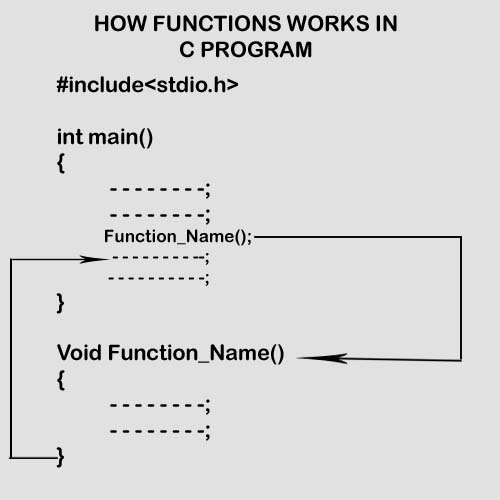
The execution of a C program begins from the main() function.
When the compiler encounters functionName();, control of the program jumps to
void functionName()
And, the compiler starts executing the codes inside functionName().
The control of the program jumps back to the main() function once code inside the function definition is executed.
Example: User-defined function
Here is an example to add two integers. To perform this task, we have created an user-defined addNumbers().
#include <stdio.h>
int addNumbers(int a, int b); // function prototype
int main()
{
int n1,n2,sum;
printf("Enters two numbers: ");
scanf("%d %d",&n1,&n2);
sum = addNumbers(n1, n2); // function call
printf("sum = %d",sum);
return 0;
}
int addNumbers(int a, int b) // function definition
{
int result;
result = a+b;
return result; // return statement
}
Function prototype
A function prototype is simply the declaration of a function that specifies function's name, parameters and return type.
It doesn't contain function body.
A function prototype gives information to the compiler that the function may later be used in the program.
Syntax of function prototype
returnType functionName(type1 argument1, type2 argument2, ...);
In the above example, int addNumbers(int a, int b); is the function prototype which provides the following information to the compiler:
- name of the function is addNumbers()
- return type of the function is int
- two arguments of type int are passed to the function
The function prototype is not needed if the user-defined function is defined before the main() function.
Calling a function
Control of the program is transferred to the user-defined function by calling it.
Syntax of function call
functionName(argument1, argument2, ...);
In the above example, the function call is made using addNumbers(n1, n2); statement inside the main() function.
Function definition
Function definition contains the block of code to perform a specific task. In our example, adding two numbers and returning it.
Syntax of function definition
returnType functionName(type1 argument1, type2 argument2, ...)
{
//body of the function
}
When a function is called, the control of the program is transferred to the function definition.
And, the compiler starts executing the codes inside the body of a function.
Passing arguments to a function
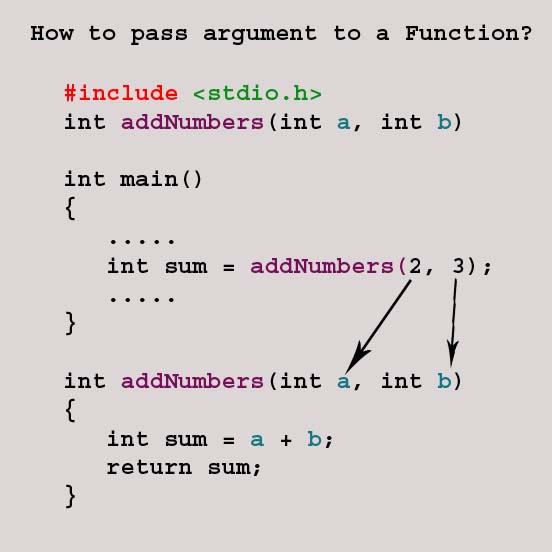
In programming, argument refers to the variable passed to the function. In the above example, two variables n1 and n2 are passed during the function call.
The parameters a and b accepts the passed arguments in the function definition. These arguments are called formal parameters of the function.
 ![]()
The type of arguments passed to a function and the formal parameters must match, otherwise, the compiler will throw an error.
If n1 is of char type, a also should be of char type. If n2 is of float type, variable b also should be of float type.
A function can also be called without passing an argument.
Return Statement
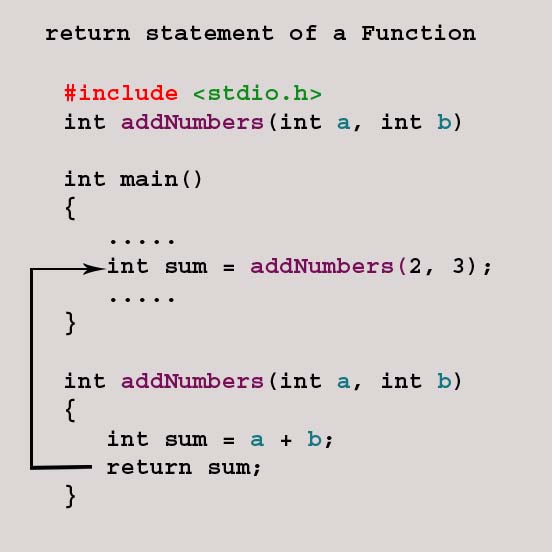
The return statement terminates the execution of a function and returns a value to the calling function. The program control is transferred to the calling function after the return statement.
In the above example, the value of the result variable is returned to the main function. The sum variable in the main() function is assigned this value.
Syntax of return statement
return (expression);
For example,
return a;
return (a+b);
The type of value returned from the function and the return type specified in the function prototype and function definition must match.
Advantages of user-defined function
- The program will be easier to understand, maintain and debug.
- Reusable codes that can be used in other programs
- A large program can be divided into smaller modules. Hence, a large project can be divided among many programmers.
|