Pointers
Pointers in C are easy and fun to learn. Some C programming tasks are performed more easily with pointers,
and other tasks, such as dynamic memory allocation, cannot be performed without using pointers.
So it becomes necessary to learn pointers to become a perfect C programmer.
Let's start learning them in simple and easy steps.
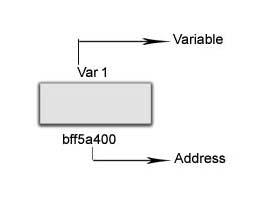
As you know, every variable is a memory location and every memory location has its address defined which can be accessed using ampersand (&) operator,
which denotes an address in memory.
Consider the following example, which prints the address of the variables defined.
include <stdio.h>
int main () {
int var1;
printf("Address of var1 variable: %x\n", &var1 );
return 0;
}
When the above code is compiled and executed, it produces the following result
Output
Address of var1 variable: bff5a400
What are Pointers?
A pointer is a variable whose value is the address of another variable, i.e., direct address of the memory location.
Like any variable or constant, you must declare a pointer before using it to store any variable address.
The general form of a pointer variable declaration is.
type *var-name;
Here, type is the pointer's base type; it must be a valid C data type and var-name is the name of the pointer variable.
The asterisk * used to declare a pointer is the same asterisk used for multiplication.
However, in this statement the asterisk is being used to designate a variable as a pointer.
Take a look at some of the valid pointer declarations.
int *num1; // pointer to an integer
double *num2; // pointer to a double
float *num3; // pointer to a float
char *ch // pointer to a character
The actual data type of the value of all pointers, whether integer, float, character, or otherwise, is the same, a long hexadecimal number that represents a memory address.
The only difference between pointers of different data types is the data type of the variable or constant that the pointer points to.
How to Use Pointers?
There are a few important operations, which we will do with the help of pointers very frequently.
(a) We define a pointer variable,
(b) assign the address of a variable to a pointer and
(c) finally access the value at the address available in the pointer variable.
This is done by using unary operator * that returns the value of the variable located at the address specified by its operand.
The following example makes use of these operations.
#include <stdio.h>
int main () {
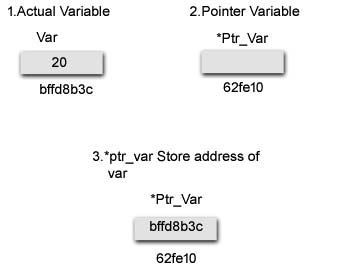
int var = 20; // actual variable declaration
int *ptr_var; // pointer variable declaration
ptr_var = &var; // store address of var in pointer variable
printf("Address of var variable: %x\n", &var );
/* address stored in pointer variable */
printf("Address stored in ptr variable: %x\n", ptr );
/*Address of *ptr_var Pointer variable is */
printf("The Address stored into *ptr_var: %x", &ptr_var);
/* access the value using the pointer */
printf("Value of *ptr variable: %d\n", *ptr );
return 0;
}
When the above code is compiled and executed, it produces the following result-
Address of var variable: bffd8b3c
Address stored in ptr variable: bffd8b3c
The Address stored into *ptr_var: 62fe10
Value of *ptr variable: 20
Common mistakes when working with pointers
Suppose, you want pointer pc to point to the address of c. Then,
int c, *pc;
// pc is address but c is not
pc = c; // Error
// &c is address but *pc is not
*pc = &c; // Error
// both &c and pc are addresses
pc = &c;
// both c and *pc values
*pc = c;
Relationship Between Arrays and Pointers
Before you learn about the relationship between arrays and pointers, be sure to check these two topics:
- C Arrays
- C Pointers
An array is a block of sequential data. Let's write a program to print addresses of array elements.
#include <stdio.h>
int main() {
int x[4];
int i;
for(i = 0; i < 4; ++i) {
printf("&x[%d] = %p\n", i, &x[i]);
}
printf("Address of array x: %p", x);
return 0;
}
Output:
&x[0] = 1450734448
&x[1] = 1450734452
&x[2] = 1450734456
&x[3] = 1450734460
Address of array x: 1450734448
Arrays and Pointers
#include <stdio.h >
int main() {
int x[5] = {1, 2, 3, 4, 5};
int* ptr;
// ptr is assigned the address of the third element
ptr = &x[2];
printf("*ptr = %d \n", *ptr); // 3
printf("*(ptr+1) = %d \n", *(ptr+1)); // 4
printf("*(ptr-1) = %d", *(ptr-1)); // 2
return 0;
}
When you run the program, the output will be:
*ptr = 3
*(ptr+1) = 4
*(ptr-1) = 2
In this example, &x[2], the address of the third element, is assigned to the ptr pointer. Hence, 3 was displayed when we printed *ptr.
And, printing *(ptr+1) gives us the fourth element. Similarly, printing *(ptr-1) gives us the second element.
C Pass Addresses and Pointers
In C programming, it is also possible to pass addresses as arguments to functions.
To accept these addresses in the function definition, we can use pointers.
It's because pointers are used to store addresses. Let's take an example:
Example: Pass Addresses to Functions
#include <stdio.h>
void swap(int *n1, int *n2);
int main()
{
int num1 = 5, num2 = 10;
// address of num1 and num2 is passed
swap( &num1, &num2);
printf("num1 = %d\n", num1);
printf("num2 = %d", num2);
return 0;
}
void swap(int* n1, int* n2)
{
int temp;
temp = *n1;
*n1 = *n2;
*n2 = temp;
}
When you run the program, the output will be:
num1 = 10
num2 = 5
The address of num1 and num2 are passed to the swap() function using swap(&num1, &num2);.
Pointers n1 and n2 accept these arguments in the function definition.
void swap(int* n1, int* n2) {
... ..
}
When *n1 and *n2 are changed inside the swap() function, num1 and num2 inside the main() function are also changed.
Inside the swap() function, *n1 and *n2 swapped. Hence, num1 and num2 are also swapped.
Notice that swap() is not returning anything; its return type is void.
Passing Pointers to Functions
#include <stdio.h>
void addOne(int* ptr) {
(*ptr)++; // adding 1 to *ptr
}
int main()
{
int* p, i = 10;
p = &i;
addOne(p);
printf("%d", *p); // 11
return 0;
}
Here, the value stored at p, *p, is 10 initially.
We then passed the pointer p to the addOne() function. The ptr pointer gets this address in the addOne() function.
Inside the function, we increased the value stored at ptr by 1 using (*ptr)++;. Since ptr and p pointers both have the same address, *p inside main() is also 11.
Types of Pointers:
There are eight different types of pointers they are:
- Null pointer
- Void pointer
- Wild pointer
- Dangling pointer
- Complex pointer
- Near pointer
- Far pointer
- Huge pointer
Void pointer
Void pointer is a specific pointer type - void * - a pointer that points to some data location in storage, which doesn't have any specific type. Void refers to the type. Basically the type of data that it points to is can be any. If we assign address of char data type to void pointer it will become char Pointer, if int data type then int pointer and so on. Any pointer type is convertible to a void pointer hence it can point to any value.
Important Points
- void pointers cannot be dereferenced. It can however be done using typecasting the void pointer.
- Pointer arithmetic is not possible on pointers of void due to lack of concrete value and thus size.
#include<<stdio.h>
int main()
{
int n=5;
void *ptr;
ptr = &n;
printf("The adress of of n Stored in ptr is %x",ptr); //The output is the Address of n Variable
}
Void Pointer can't Dereferenced
#include<stdio.h>
int main()
{
int n=5;
void *ptr;
ptr = &n;
printf("The adress of of n Stored in ptr is %d", *ptr); //The output is Error because Void pointer can't Dereferenced
}
Void Pointer can Derefrenced using Type Casting
#include<stdlib.h>
int main()
{
int x = 4;
float y = 5.5;
//A void pointer
void *ptr;
ptr = &x;
// (int*)ptr - does type casting of void
// *((int*)ptr) dereferences the typecasted
// void pointer variable.
printf("Integer variable is = %d", *( (int*) ptr) );
// void pointer is now float
ptr = &y;
printf("\nFloat variable is= %f", *( (float*) ptr) );
return 0;
}
Output:
Integer variable is = 4
Float variable is= 5.500000
NULL pointer in C
A null pointer is a pointer which points nothing.Some uses of the null pointer are:
a) To initialize a pointer variable when that pointer variable isn't assigned any valid memory address yet.
b) To pass a null pointer to a function argument when we don't want to pass any valid memory address.
c) To check for null pointer before accessing any pointer variable.
So that, we can perform error handling in pointer related code e.g. dereference pointer variable only if it's not NULL.
Example
#include <stdio.h>
int main() {
int *p= NULL;//initialize the pointer as null.
printf("The value of pointer is %u",p);
return 0;
}
Output
The value of pointer is 0.
Wild Pointers
Uninitialized pointers are known as wild pointers because they point to some arbitrary memory location and may cause a program to crash or behave badly.
int main()
{
int *p; /* wild pointer */
/* Some unknown memory location is being corrupted.
This should never be done. */
*p = 12;
}
Please note that if a pointer p points to a known variable then it's not a wild pointer. In the below program, p is a wild pointer till this points to a.
int main()
{
int *p; /* wild pointer */
int a = 10;
p = &a; /* p is not a wild pointer now*/
*p = 12; /* This is fine. Value of a is changed */
}
If we want pointer to a value (or set of values) without having a variable for the value, we should explicitly allocate memory and put the value in allocated memory.
int main()
{
int *p = (int *)malloc(sizeof(int));
*p = 12; /* This is fine (assuming malloc doesn't return NULL) */
}
Dangling Pointers in C
The most common bugs related to pointers and memory management is dangling/wild pointers. Sometimes the programmer fails to initialize the pointer with a valid address, then this type of initialized pointer is known as a dangling pointer in C.
Dangling pointer occurs at the time of the object destruction when the object is deleted or de-allocated from memory without modifying the value of the pointer. In this case, the pointer is pointing to the memory, which is de-allocated. The dangling pointer can point to the memory, which contains either the program code or the code of the operating system. If we assign the value to this pointer, then it overwrites the value of the program code or operating system instructions; in such cases, the program will show the undesirable result or may even crash. If the memory is re-allocated to some other process, then we dereference the dangling pointer will cause the segmentation faults.
Let's understand the dangling pointer through some C programs.
Using free() function to de-allocate the memory.
#include <stdio.h>
int main()
{
int *ptr=(int *)malloc(sizeof(int));
int a=560;
ptr=&a;
free(ptr);
return 0;
}
In the above code, we have created two variables, i.e., *ptr and a where 'ptr' is a pointer and 'a' is a integer variable. The *ptr is a pointer variable which is created with the help of malloc() function. As we know that malloc() function returns void, so we use int * to convert void pointer into int pointer.
The statement int *ptr=(int *)malloc(sizeof(int)); will allocate the memory with 4 bytes.
The statement free(ptr) de-allocates the memory. and 'ptr' pointer becomes dangling as it is pointing to the de-allocated memory.
Variable goes out of the scope
When the variable goes out of the scope then the pointer pointing to the variable becomes a dangling pointer.
#include<stdio.h> >
int main()
{
char *str;
{
char a = ?A?;
str = &a;
}
// a falls out of scope
// str is now a dangling pointer
printf("%s", *str);
}
In the above code, we did the following steps:
- First, we declare the pointer variable named 'str'.
- In the inner scope, we declare a character variable. The str pointer contains the address of the variable 'a'.
- When the control comes out of the inner scope, 'a' variable will no longer be available, so str points to the de-allocated memory. It means that the str pointer becomes the dangling pointer.
Now, we will see how the pointer becomes dangling when we call the function
Let's understand through an example.
#include <stdio.h>
int *fun(){
int y=10;
return &y;
}
int main()
{
int *p=fun();
printf("%d", *p);
return 0;
}
In the above code, we did the following steps:
- First, we create the main() function in which we have declared 'p' pointer that contains the return value of the fun().
- When the fun() is called, then the control moves to the context of the int *fun(), the fun() returns the address of the 'y' variable.
- When control comes back to the context of the main() function, it means the variable 'y' is no longer available. Therefore, we can say that the 'p' pointer is a dangling pointer as it points to the de-allocated memory.
Let's consider another example of a dangling pointer.
include <stdio.h>
int *fun()
{
static int y=10;
return &y;
}
int main()
{
int *p=fun();
printf("%d", *p);
return 0;
}
The above code is similar to the previous one but the only difference is that the variable 'y' is static. We know that static variable stores in the global memory.
The fun() function is called, then the control moves to the context of the int *fun(). As 'y' is a static variable,
so it stores in the global memory; Its scope is available throughout the program.
When the address value is returned, then the control comes back to the context of the main().
The pointer 'p' contains the address of 'y', i.e., 100. When we print the value of '*p',
then it prints the value of 'y', i.e., 10. Therefore,
we can say that the pointer 'p' is not a dangling pointer as it contains the address of the variable which is stored in the global memory.
Avoiding Dangling Pointer Errors
The dangling pointer errors can be avoided by initializing the pointer to the NULL value. If we assign the NULL value to the pointer, then the pointer will not point to the de-allocated memory. Assigning NULL value to the pointer means that the pointer is not pointing to any memory location.
near, far and huge pointers
These are some old concepts used in 16 bit intel architectures in the days of MS DOS, not much useful anymore.
- Near pointer is used to store 16 bit addresses means within current segment on a 16 bit machine. The limitation is that we can only access 64kb of data at a time.
- A far pointer is typically 32 bit that can access memory outside current segment. To use this, compiler allocates a segment register to store segment address, then another register to store offset within current segment.
- Like far pointer, huge pointer is also typically 32 bit and can access outside segment. In case of far pointers, a segment is fixed. In far pointer, the segment part cannot be modified, but in Huge it can be
|